



Microsoft cloud storage service for files, message queues and application data

Open-source file transfer and cloud storage browser for Mac and Windows users
By Iterate

Cyberduck is a libre browser for servers and cloud storage, available for macOS and Windows. It gives users one interface for connecting to file servers and storage services, with connection profiles ready for popular hosting providers.
Profile written by TrustList from the business's own published information, Oct 2026.
2 images - click to enlarge
As of 2026-10-26. Organic ranks only; sponsored placements are never ranks.
Used it? Your experience helps other buyers decide.
Write a reviewNo questions yet. Be the first to ask about Cyberduck.
Similar listings buyers compare against this one.
Microsoft cloud storage service for files, message queues and application data

Amazon cloud object storage for collecting, storing and analysing data securely
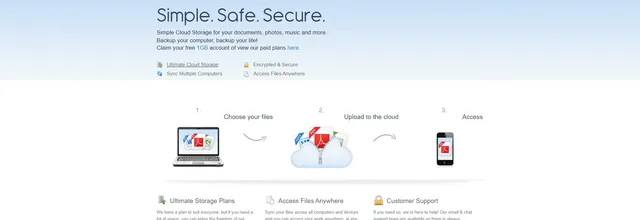
Online storage and automatic computer backup for documents, photos and music

Cloud file streaming that lets distributed teams work on very large files as if stored locally

Document management and workflow software for companies that want contracts, invoices and cases in one place

SaaS archiving service from Barracuda Networks for businesses that keep data in the cloud
Articles that share the Archiving & Retention tag or mention this listing.
%22%2F%3E%3C%2Fmask%3E%3ClinearGradient%20id%3D%22bar%22%20x1%3D%220%22%20y1%3D%220%22%20x2%3D%220%22%20y2%3D%221%22%3E%3Cstop%20offset%3D%220%25%22%20stop-color%3D%22%23fecdd3%22%20stop-opacity%3D%220.6%22%2F%3E%3Cstop%20offset%3D%22100%25%22%20stop-color%3D%22%23f43f5e%22%20stop-opacity%3D%220.12%22%2F%3E%3C%2FlinearGradient%3E%3C%2Fdefs%3E%3Crect%20width%3D%22640%22%20height%3D%22360%22%20fill%3D%22url(%23bg)%22%2F%3E%3Crect%20width%3D%22640%22%20height%3D%22360%22%20fill%3D%22url(%23g1)%22%2F%3E%3Crect%20width%3D%22640%22%20height%3D%22360%22%20fill%3D%22url(%23g2)%22%2F%3E%3Cpath%20d%3D%22M-40%20350.4%20Q%20266.5%20126.3%20680%2080.3%22%20fill%3D%22none%22%20stroke%3D%22%23ffffff%22%20stroke-opacity%3D%220.039%22%20stroke-width%3D%2236.4%22%2F%3E%3Crect%20width%3D%22640%22%20height%3D%22360%22%20fill%3D%22url(%23dots)%22%20mask%3D%22url(%23dotmask)%22%2F%3E%3Cg%20transform%3D%22translate(448.8%20189)%20scale(0.9)%20translate(-470%20-180)%22%3E%3Cg%20transform%3D%22rotate(-13.2%20470%20266)%22%3E%3Crect%20x%3D%22392%22%20y%3D%2282%22%20width%3D%22156%22%20height%3D%22200%22%20rx%3D%2216%22%20fill%3D%22%239f1239%22%20fill-opacity%3D%220.75%22%20stroke%3D%22%23fecdd3%22%20stroke-opacity%3D%220.5%22%2F%3E%3C%2Fg%3E%3Cg%20transform%3D%22rotate(-1.2%20470%20266)%22%3E%3Crect%20x%3D%22392%22%20y%3D%2282%22%20width%3D%22156%22%20height%3D%22200%22%20rx%3D%2216%22%20fill%3D%22%239f1239%22%20fill-opacity%3D%220.75%22%20stroke%3D%22%23fecdd3%22%20stroke-opacity%3D%220.5%22%2F%3E%3C%2Fg%3E%3Cg%20transform%3D%22rotate(10.8%20470%20266)%22%3E%3Crect%20x%3D%22392%22%20y%3D%2282%22%20width%3D%22156%22%20height%3D%22200%22%20rx%3D%2216%22%20fill%3D%22%23ffffff%22%20fill-opacity%3D%220.96%22%20stroke%3D%22%23fecdd3%22%20stroke-opacity%3D%220.5%22%2F%3E%3Crect%20x%3D%22414%22%20y%3D%22104%22%20width%3D%2244%22%20height%3D%2244%22%20rx%3D%2210%22%20fill%3D%22%23f43f5e%22%2F%3E%3Crect%20x%3D%22414%22%20y%3D%22164%22%20width%3D%22112%22%20height%3D%2210%22%20rx%3D%225%22%20fill%3D%22%234c0519%22%20fill-opacity%3D%220.8%22%2F%3E%3Crect%20x%3D%22414%22%20y%3D%22184%22%20width%3D%2284%22%20height%3D%228%22%20rx%3D%224%22%20fill%3D%22%234c0519%22%20fill-opacity%3D%220.35%22%2F%3E%3Crect%20x%3D%22414%22%20y%3D%22200%22%20width%3D%2296%22%20height%3D%228%22%20rx%3D%224%22%20fill%3D%22%234c0519%22%20fill-opacity%3D%220.35%22%2F%3E%3Crect%20x%3D%22414%22%20y%3D%22238%22%20width%3D%2260%22%20height%3D%2222%22%20rx%3D%2211%22%20fill%3D%22%23f43f5e%22%2F%3E%3C%2Fg%3E%3Cpath%20d%3D%22M558%2068%20l6%2014%20l14%206%20l-14%206%20l-6%2014%20l-6%20-14%20l-14%20-6%20l14%20-6%20Z%22%20fill%3D%22%23ffffff%22%2F%3E%3C%2Fg%3E%3C%2Fsvg%3E) India
India25 Oct 2026
Oracle scores the Java gap 9.1 and pulls the eMudhra roots from every supported JDK line; Cisco lists Duo upgrades now, Meraki camera…
%22%2F%3E%3C%2Fmask%3E%3ClinearGradient%20id%3D%22bar%22%20x1%3D%220%22%20y1%3D%220%22%20x2%3D%220%22%20y2%3D%221%22%3E%3Cstop%20offset%3D%220%25%22%20stop-color%3D%22%23e0e7ff%22%20stop-opacity%3D%220.6%22%2F%3E%3Cstop%20offset%3D%22100%25%22%20stop-color%3D%22%23fb923c%22%20stop-opacity%3D%220.12%22%2F%3E%3C%2FlinearGradient%3E%3C%2Fdefs%3E%3Crect%20width%3D%22640%22%20height%3D%22360%22%20fill%3D%22url(%23bg)%22%2F%3E%3Crect%20width%3D%22640%22%20height%3D%22360%22%20fill%3D%22url(%23g1)%22%2F%3E%3Crect%20width%3D%22640%22%20height%3D%22360%22%20fill%3D%22url(%23g2)%22%2F%3E%3Cpath%20d%3D%22M-40%20264.6%20Q%20259.6%20147.8%20680%2085.1%22%20fill%3D%22none%22%20stroke%3D%22%23ffffff%22%20stroke-opacity%3D%220.035%22%20stroke-width%3D%2242%22%2F%3E%3Crect%20width%3D%22640%22%20height%3D%22360%22%20fill%3D%22url(%23dots)%22%20mask%3D%22url(%23dotmask)%22%2F%3E%3Cg%20transform%3D%22translate(483.1%20179.8)%20scale(1.1)%20translate(-470%20-180)%22%3E%3Ccircle%20cx%3D%22470%22%20cy%3D%22180%22%20r%3D%22126%22%20fill%3D%22none%22%20stroke%3D%22%23e0e7ff%22%20stroke-opacity%3D%220.2%22%20stroke-width%3D%221.4%22%20stroke-dasharray%3D%222%209%22%2F%3E%3Ccircle%20cx%3D%22470%22%20cy%3D%22180%22%20r%3D%22152%22%20fill%3D%22none%22%20stroke%3D%22%23e0e7ff%22%20stroke-opacity%3D%220.2%22%20stroke-width%3D%221.4%22%20stroke-dasharray%3D%222%209%22%2F%3E%3Ccircle%20cx%3D%22470%22%20cy%3D%22180%22%20r%3D%22178%22%20fill%3D%22none%22%20stroke%3D%22%23e0e7ff%22%20stroke-opacity%3D%220.1%22%20stroke-width%3D%221.4%22%20stroke-dasharray%3D%222%209%22%2F%3E%3Cpath%20d%3D%22M382%2076%20H558%20C558%20132%20482%20160%20482%20180%20C482%20200%20558%20228%20558%20284%20H382%20C382%20228%20458%20200%20458%20180%20C458%20160%20382%20132%20382%2076%20Z%22%20fill%3D%22%23ffffff%22%20fill-opacity%3D%220.14%22%20stroke%3D%22%23ffffff%22%20stroke-width%3D%224%22%20stroke-linejoin%3D%22round%22%2F%3E%3Cpath%20d%3D%22M446%20159.6%20Q470%20185.6%20494%20159.6%20L476%20176%20L464%20176%20Z%22%20fill%3D%22%23fb923c%22%2F%3E%3Cline%20x1%3D%22470%22%20y1%3D%22178%22%20x2%3D%22470%22%20y2%3D%22240%22%20stroke%3D%22%23fb923c%22%20stroke-width%3D%223%22%20stroke-dasharray%3D%224%205%22%2F%3E%3Cpath%20d%3D%22M392%20282%20Q470%20194%20548%20282%20Z%22%20fill%3D%22%23fb923c%22%2F%3E%3Crect%20x%3D%22360%22%20y%3D%2262%22%20width%3D%22220%22%20height%3D%2216%22%20rx%3D%228%22%20fill%3D%22%23ffffff%22%2F%3E%3Crect%20x%3D%22360%22%20y%3D%22282%22%20width%3D%22220%22%20height%3D%2216%22%20rx%3D%228%22%20fill%3D%22%23ffffff%22%2F%3E%3C%2Fg%3E%3C%2Fsvg%3E) United States
United States22 Oct 2026
The certificates are technically sound but did not match the policy GoDaddy published for its Starfield and GoDaddy hierarchies. Industry…
%22%2F%3E%3C%2Fmask%3E%3ClinearGradient%20id%3D%22bar%22%20x1%3D%220%22%20y1%3D%220%22%20x2%3D%220%22%20y2%3D%221%22%3E%3Cstop%20offset%3D%220%25%22%20stop-color%3D%22%23a7f3d0%22%20stop-opacity%3D%220.6%22%2F%3E%3Cstop%20offset%3D%22100%25%22%20stop-color%3D%22%2310b981%22%20stop-opacity%3D%220.12%22%2F%3E%3C%2FlinearGradient%3E%3C%2Fdefs%3E%3Crect%20width%3D%22640%22%20height%3D%22360%22%20fill%3D%22url(%23bg)%22%2F%3E%3Crect%20width%3D%22640%22%20height%3D%22360%22%20fill%3D%22url(%23g1)%22%2F%3E%3Crect%20width%3D%22640%22%20height%3D%22360%22%20fill%3D%22url(%23g2)%22%2F%3E%3Cpath%20d%3D%22M-40%20250.9%20Q%20276.3%20163.4%20680%20159%22%20fill%3D%22none%22%20stroke%3D%22%23ffffff%22%20stroke-opacity%3D%220.036%22%20stroke-width%3D%2242.8%22%2F%3E%3Crect%20width%3D%22640%22%20height%3D%22360%22%20fill%3D%22url(%23dots)%22%20mask%3D%22url(%23dotmask)%22%2F%3E%3Cg%20transform%3D%22translate(470.4%20169.3)%20scale(1)%20translate(-470%20-180)%22%3E%3Cpath%20d%3D%22M300%2049.4%20C420%2049.4%20460%20188.9%20560%20188.9%22%20fill%3D%22none%22%20stroke%3D%22%23a7f3d0%22%20stroke-opacity%3D%220.4%22%20stroke-width%3D%222%22%20stroke-linecap%3D%22round%22%2F%3E%3Ccircle%20cx%3D%22300%22%20cy%3D%2249.4%22%20r%3D%224%22%20fill%3D%22%23a7f3d0%22%20fill-opacity%3D%220.7%22%2F%3E%3Cpath%20d%3D%22M300%2081%20C420%2081%20460%20188.9%20560%20188.9%22%20fill%3D%22none%22%20stroke%3D%22%23a7f3d0%22%20stroke-opacity%3D%220.4%22%20stroke-width%3D%222%22%20stroke-linecap%3D%22round%22%2F%3E%3Ccircle%20cx%3D%22300%22%20cy%3D%2281%22%20r%3D%224%22%20fill%3D%22%23a7f3d0%22%20fill-opacity%3D%220.7%22%2F%3E%3Cpath%20d%3D%22M300%20112.1%20C420%20112.1%20460%20188.9%20560%20188.9%22%20fill%3D%22none%22%20stroke%3D%22%23a7f3d0%22%20stroke-opacity%3D%220.5%22%20stroke-width%3D%222%22%20stroke-linecap%3D%22round%22%2F%3E%3Ccircle%20cx%3D%22300%22%20cy%3D%22112.1%22%20r%3D%224%22%20fill%3D%22%23a7f3d0%22%20fill-opacity%3D%220.7%22%2F%3E%3Cpath%20d%3D%22M300%20152.1%20C420%20152.1%20460%20188.9%20560%20188.9%22%20fill%3D%22none%22%20stroke%3D%22%23a7f3d0%22%20stroke-opacity%3D%220.3%22%20stroke-width%3D%222%22%20stroke-linecap%3D%22round%22%2F%3E%3Ccircle%20cx%3D%22300%22%20cy%3D%22152.1%22%20r%3D%224%22%20fill%3D%22%23a7f3d0%22%20fill-opacity%3D%220.7%22%2F%3E%3Cpath%20d%3D%22M300%20183.7%20C420%20183.7%20460%20188.9%20560%20188.9%22%20fill%3D%22none%22%20stroke%3D%22%23a7f3d0%22%20stroke-opacity%3D%220.3%22%20stroke-width%3D%222%22%20stroke-linecap%3D%22round%22%2F%3E%3Ccircle%20cx%3D%22300%22%20cy%3D%22183.7%22%20r%3D%224%22%20fill%3D%22%23a7f3d0%22%20fill-opacity%3D%220.7%22%2F%3E%3Cpath%20d%3D%22M300%20222.7%20C420%20222.7%20460%20188.9%20560%20188.9%22%20fill%3D%22none%22%20stroke%3D%22%23a7f3d0%22%20stroke-opacity%3D%220.4%22%20stroke-width%3D%222%22%20stroke-linecap%3D%22round%22%2F%3E%3Ccircle%20cx%3D%22300%22%20cy%3D%22222.7%22%20r%3D%224%22%20fill%3D%22%23a7f3d0%22%20fill-opacity%3D%220.7%22%2F%3E%3Cpath%20d%3D%22M300%20251.2%20C420%20251.2%20460%20188.9%20560%20188.9%22%20fill%3D%22none%22%20stroke%3D%22%23a7f3d0%22%20stroke-opacity%3D%220.5%22%20stroke-width%3D%222%22%20stroke-linecap%3D%22round%22%2F%3E%3Ccircle%20cx%3D%22300%22%20cy%3D%22251.2%22%20r%3D%224%22%20fill%3D%22%23a7f3d0%22%20fill-opacity%3D%220.7%22%2F%3E%3Cpath%20d%3D%22M300%20285.4%20C420%20285.4%20460%20188.9%20560%20188.9%22%20fill%3D%22none%22%20stroke%3D%22%23a7f3d0%22%20stroke-opacity%3D%220.4%22%20stroke-width%3D%222%22%20stroke-linecap%3D%22round%22%2F%3E%3Ccircle%20cx%3D%22300%22%20cy%3D%22285.4%22%20r%3D%224%22%20fill%3D%22%23a7f3d0%22%20fill-opacity%3D%220.7%22%2F%3E%3Cpath%20d%3D%22M300%20324.8%20C420%20324.8%20460%20188.9%20560%20188.9%22%20fill%3D%22none%22%20stroke%3D%22%23a7f3d0%22%20stroke-opacity%3D%220.4%22%20stroke-width%3D%222%22%20stroke-linecap%3D%22round%22%2F%3E%3Ccircle%20cx%3D%22300%22%20cy%3D%22324.8%22%20r%3D%224%22%20fill%3D%22%23a7f3d0%22%20fill-opacity%3D%220.7%22%2F%3E%3Cline%20x1%3D%22560%22%20y1%3D%22188.9%22%20x2%3D%22620%22%20y2%3D%22188.9%22%20stroke%3D%22%23ffffff%22%20stroke-width%3D%224%22%20stroke-linecap%3D%22round%22%2F%3E%3Ccircle%20cx%3D%22560%22%20cy%3D%22188.9%22%20r%3D%2228%22%20fill%3D%22%2310b981%22%20fill-opacity%3D%220.35%22%2F%3E%3Ccircle%20cx%3D%22560%22%20cy%3D%22188.9%22%20r%3D%2214%22%20fill%3D%22%23ffffff%22%2F%3E%3C%2Fg%3E%3C%2Fsvg%3E) India
India22 Oct 2026
The Bengaluru-listed trust company says its board chose to withdraw a week after eight intermediate keys were exposed. Its G1 RSA roots…
Everything here links back to the same verified catalogue. Pick your next stop.


