Open source suite of connected business apps covering sales, accounting, inventory and more

Cross-platform text editor for writing code, markup and prose
By Sublime HQ
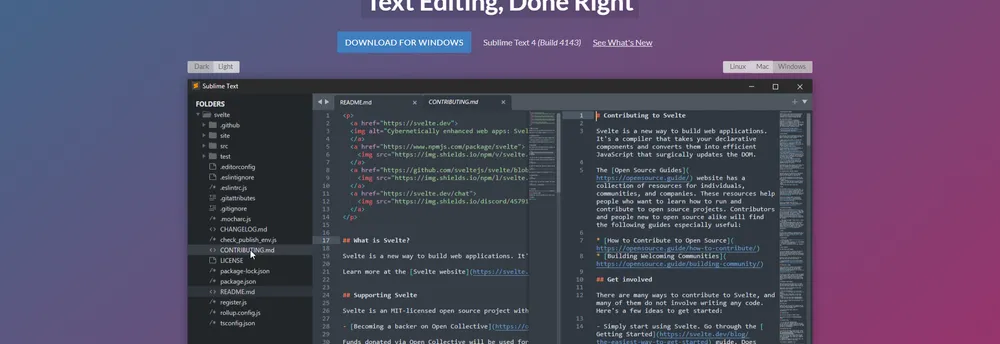
Sublime Text is an editor for code, markup and prose. Version 4 moves interface drawing onto the graphics processor on Linux, Mac and Windows. The company says this keeps the interface fluid up to 8K screens while using less power than before. On Apple Silicon Macs the editor runs natively, and Linux ARM64 builds are offered for small boards such as the Raspberry Pi.
Tab Multi-Select makes open tabs first-class in the interface. A modifier key used with an action splits the window to show several tabs at once, and the feature works across the side bar, the tab bar and Goto Anything. Definitions can open side by side with the code that calls them, from Goto Definition, Goto Reference and Goto Symbol in Project, or by holding a modifier while clicking a link. A programmer can read the full definition without losing their place.
The auto complete engine has been rewritten to suggest completions drawn from the code already in a project. Suggestions show what kind of symbol they describe and link to its definition, and pressing F12 on a symbol opens the definition beside the file. Multiple selections let the same change be made in several places: Ctrl+D selects the next occurrence of the current word, Ctrl+K followed by Ctrl+D skips one, and every selection stays fully editable. TypeScript, JSX and TSX are supported by default. The syntax highlighting engine handles more complex grammars, multi-line constructs and syntax inheritance, and memory use has been reduced while load times are faster.
The editor ships with 23 visual themes and a minimap in the top-right corner that gives a reduced view of the whole file. More themes can be downloaded, and custom themes can be added through plugins. The Default and Adaptive themes were refreshed with new tab styles and dimming of inactive panes, and color schemes can switch between light and dark automatically. The plugin interface now uses Python 3.8 and keeps compatibility with packages written for Sublime Text 3, and it has been expanded so that plugins such as language server clients work better. Sublime Merge, a cross-platform Git client, is presented as part of the same family.
Sublime Text is a text editor used to write code, markup and ordinary prose. The current major version, Sublime Text 4, runs on Windows, Mac and Linux. It is filed here under application development software.
Summary written by TrustList from the business's own published information, Nov 2026.
2 images - click to enlarge
Used it? Your experience helps other buyers decide.
Write a reviewNo questions yet. Be the first to ask about Sublime Text.
Similar listings buyers compare against this one.
Open source suite of connected business apps covering sales, accounting, inventory and more

Microsoft's cloud platform, including App Service for hosting web and mobile apps

Managed cloud platform where developers deploy, run and scale applications in containers

Integrated development environment for building Java-based applications on Oracle platforms

Technical computing system for calculations, visualisation and documents, on desktop or in the cloud

Open source text and source code editor for Windows that replaces the built-in Notepad

Low-code builder that turns an existing database into a web application

Tool that converts Objective-C code to Swift for iOS and Mac developers
Articles that share the Software Development tag or mention this listing.
 Cybersecurity
16 Nov 2026
Two weeks after a tampered coding extension appeared in its marketplace, Cursor says at most 5,000 users could have received it, and that…
 United States of America
13 Nov 2026
Kleiner Perkins and Clearlake Capital lead the round, with Google and Battery Ventures joining, three weeks after Mirendil said one…
 Australia
13 Nov 2026
The quantum software company, founded in 2017 with offices from Sydney to Oxford, says the round, A$415 million, was expanded twice and…
Everything here links back to the same verified catalogue. Pick your next stop.