


Employee communication platform with analytics for leaders managing dispersed workforces

Digital Workplace Software
RemoteHQ
RemoteHQ is a cloud browser that lets remote teams co-browse and co-edit any web app together
- Discussion Boards
- 24/7 (Live Rep)
- Documentation
- Live Online
- +14 more
About RemoteHQ
A shared browser for remote teams
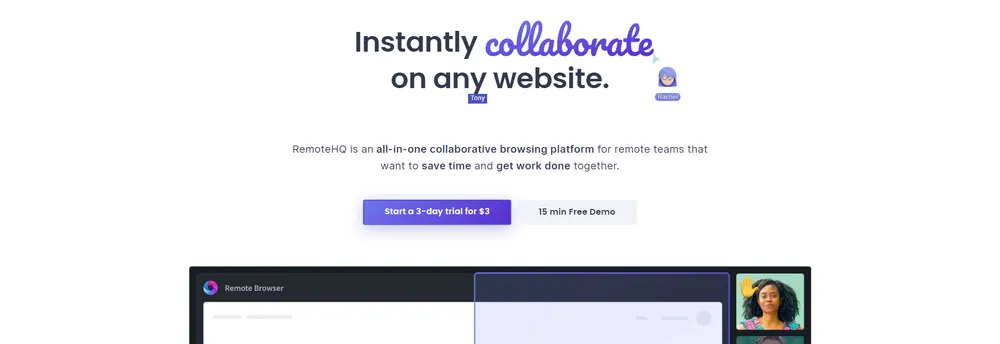
RemoteHQ is a collaborative browsing platform for remote teams. Its remote browser is a multiplayer, cloud-based browser in which team members can co-browse and co-edit any web application together, and in which customers can join too. The company describes it as interactive screen sharing that needs no download and avoids the pixelation and freezing of ordinary screen sharing.
A virtual workspace for teams
According to the company, it can serve as an online office, a meeting place, a sales floor or a classroom. It suits teams that want to do more than hold a video call or share a screen, and that people can work from anywhere in the same web session.
Three ways teams use it
The company names three main uses: as a collaboration hub for team work, as a place for standups, demonstrations and training, and as a space for customer support and sales. The browser can also be placed within a product, letting customers work in it directly.
Integrations with everyday tools
The product can be launched from inside tools that teams already use, such as Slack, Zoom, Webex and Intercom. The company also names GitHub, Salesforce and InVision among the integrations it supports.
TrustList summary
RemoteHQ is a multiplayer, cloud-based browser for remote teams. Team members and customers can work through the same website together, with no download needed. The company describes it as a virtual office, meeting room, sales office or classroom.
Main features
- Remote Browser: a shared browser where people co-browse and co-edit web apps, with cursor control for everyone.
- Collaboration hub: a shared workspace for standups, demos, training and customer support.
- App integration: launches inside tools such as Slack, Zoom, Webex and Intercom.
- Embeddable browser: can be placed inside a product so that customers can work in it.
Key facts
- Integrations: Slack, Zoom, Webex, Intercom, GitHub, Salesforce and InVision are named on the site.
- Installation: no download is required.
Summary written by TrustList from the business's own published information, Nov 2026.
Gallery
2 images - click to enlarge
Categories & features
- Discussion Boards
- 24/7 (Live Rep)
- Documentation
- Live Online
- iPhone / iPad
- Web-Based, Cloud, SaaS
- Chat / Messaging
- Brainstorming
- Video Conferencing
- Android
- Web Conferencing
- Video Chat
- Remote Access
- File Sharing
- Meeting Management
- Activity/News Feed
- Real Time Editing
- Collaboration
Request a demo or quote from RemoteHQ
Reviews
Questions & answers
No questions yet. Be the first to ask about RemoteHQ.
RemoteHQ alternatives
Similar listings buyers compare against this one.

Desktop app that gathers web apps, social media and email accounts in one window

Client communication and task portal for accounting and bookkeeping firms

Drag-and-drop digital transformation platform for designing and running business processes
Related reading
Articles that share the Discussion Boards tag or mention this listing.
 Cybersecurity
18 Nov 2026
N-able ships N-central 2026.4 Hotfix 3 as a critical security update
N-able has released N-central 2026.4 Hotfix 3, a critical security update that hardens authentication, file handling and agent connections…
 Android
18 Nov 2026
Google Play sets dates for new location, contacts, local network and AppFunctions rules
Google Play will require apps targeting Android 17 to use the location button for one-off requests and to declare any use of precise…
 Cybersecurity
18 Nov 2026
ScreenConnect CVE-2026-84869 used against MSP technician clients; fix is 26.6.5
Huntress reports 688,000 guest file-run requests across 42 MSP servers and one confirmed workstation compromise; update host clients and…
Keep exploring
More on TrustList
Everything here links back to the same verified catalogue. Pick your next stop.
- Write a reviewHelp other buyers decide
- CompaniesAgencies, consultancies and IT service providers, ranked by verified reviews.
- ArticlesGuides, comparisons and research from the editorial desk and the community.
- AwardsAnnual recognition decided by verified reviews and an independent jury.
- LaunchesNew products and releases, voted up by the community every day.
- AI ModelsBenchmark scores and community ratings for every major model.
- RequestsBuyers describe what they need; vendors respond directly.
- PeopleReviewers, authors and makers with public profiles.
- ComparePut up to four listings side by side before you shortlist.