


Transcription, translation and AI data services combining machine speech recognition with human editors

Windows dictation application that types spoken words into any desktop program in 51 languages
By Lily

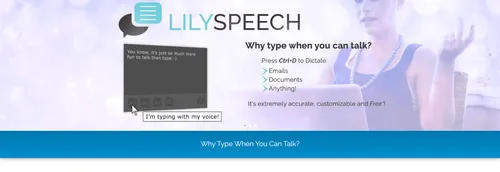
LilySpeech lets people type with their voice anywhere on a Windows desktop or laptop. A click or the Ctrl+D shortcut starts it, and the words that follow appear in whichever program is open, whether that is an email, a document or a web search box.
The application supports 51 languages. Because it works across the whole of Windows rather than inside a single editor, it suits anyone who wants to write messages, reports or searches without using the keyboard.
LilySpeech passes the audio to the speech-to-text service built into Google Chrome, which the developer describes as 99.5 percent accurate and compares to dictating text messages on an Android phone. A demonstration video shows words being dictated in real time and the display being changed in the settings.
Users can teach the program words that standard dictation might miss: business names, web addresses, the correct spelling of personal names and industry terms. The developer says this lets people in specialized fields get good results even with unusual vocabulary.
The conversion happens in the cloud rather than on the machine, so LilySpeech does not take much memory or slow other work down. It needs an internet connection for that reason.
The developer describes LilySpeech as free and fully functional without limitations, with the conditions of the free version explained on a dedicated page. It contrasts this with other speech recognition programs that cost hundreds of dollars.
LilySpeech is a speech-to-text dictation application for Windows computers. Users press a shortcut or click, then speak, and the words are typed into whatever program is open. It supports 51 languages and passes the audio to Google Chrome's speech recognition service in the cloud.
Windows desktop and laptop users who prefer talking to typing, including people in specialised industries with unusual vocabulary.
Summary written by TrustList from the business's own published information, Nov 2026.
Used it? Your experience helps other buyers decide.
Write a reviewNo questions yet. Be the first to ask about LilySpeech.
Similar listings buyers compare against this one.
Transcription, translation and AI data services combining machine speech recognition with human editors

Medical speech recognition and dictation software for clinicians, offered through the Swiss firm Voicepoint

Dictation and speech recognition software that helps physicians produce more accurate clinical reports

Browser-based voice typing tool that converts speech to text in over 70 languages
Articles that share the Automatic Transcription tag or mention this listing.
 United States of America
7 Nov 2026
The Los Angeles company builds on Gridspace voice models trained on 10 billion minutes of regulated call centre audio, and says it now…
 Cybersecurity
20 Nov 2026
The QUIC server memory flaw CVE-2026-124709 is reachable in the default configuration; the TLS 1.3 Suite B read and the PEM use-after-free…
 United States of America
20 Nov 2026
Eligible SCE customers in its emergency load programme may get up to $8,000 towards a GM home energy system and $8,099 towards…
Everything here links back to the same verified catalogue. Pick your next stop.


